Your customers already live on WhatsApp — so why send them somewhere else to call you? With SendPK WhatsApp Calling & the Smart IVR System, every voice call that lands on your WhatsApp Business number is answered automatically, guided through a friendly voice menu, and routed to exactly the right place — a human agent, an AI voice agent, or an information menu. No missed calls, no hold-music frustration, and it runs 24 hours a day, 7 days a week.
اب آپ کے کاروبار کو فون کالز سنبھالنے کے لیے کسی الگ کال سینٹر کی ضرورت نہیں۔ SendPK کا WhatsApp Calling اور Smart IVR سسٹم آپ کے واٹس ایپ نمبر پر آنے والی کالز کو خودکار طریقے سے اٹھاتا ہے، گاہک کو آواز میں مینو سناتا ہے، اور اُن کی پسند کے مطابق انہیں صحیح شعبے یا ایجنٹ تک پہنچا دیتا ہے — وہ بھی دن کے چوبیس گھنٹے۔
📞 Try the Live Demo — لائیو ڈیمو آزمائیں
Experience the entire system yourself right now. Save this number and make a WhatsApp call to hear the IVR live:
+92 335 6742000
اس نمبر کو محفوظ کریں اور واٹس ایپ پر کال کر کے ابھی سسٹم کا براہِ راست تجربہ کریں۔
What is WhatsApp Calling + IVR? — یہ کیا ہے؟
An IVR (Interactive Voice Response) is the automated voice system you hear when you call a bank or a large company: “Press 1 for balance, press 2 for support…” SendPK brings that same power directly to WhatsApp. When a customer calls your WhatsApp number, our server picks up the call instantly, plays your custom welcome message, and lets the caller choose options by pressing keys on their phone keypad. Based on what they press, the system can read out information, move them through deeper menus, hand them to a live agent, or connect them to an AI voice assistant.
سادہ الفاظ میں: جیسے بینک کی ہیلپ لائن پر آپ نمبر دبا کر اپنا کام منتخب کرتے ہیں، بالکل ویسا ہی نظام اب آپ کے واٹس ایپ نمبر پر دستیاب ہے۔ گاہک کال کرتا ہے، سسٹم خود کال اٹھاتا ہے، اور مینو کے ذریعے اُسے درست جگہ پہنچا دیتا ہے۔
How a Call Works — کال کیسے کام کرتی ہے
The journey of every call follows a simple, reliable path — from the moment your customer dials until the call is safely recorded and ended:
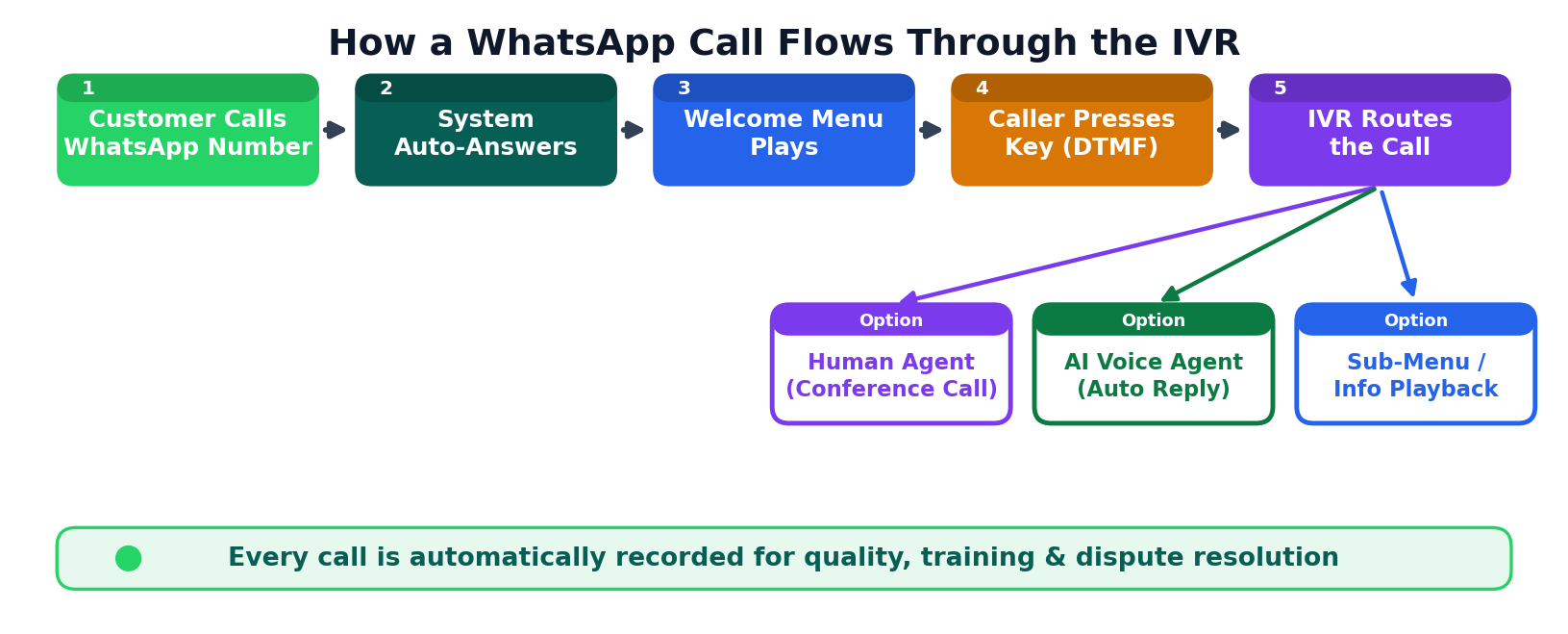
- Customer calls your WhatsApp Business number — just like any normal WhatsApp call.
- The system auto-answers within a second. No staff member needs to be online.
- A welcome menu plays in your own recorded voice or language.
- The caller presses a key (1, 2, 3…) to choose what they need. These key-presses are detected as DTMF tones.
- The IVR routes the call — to a deeper menu, a live agent, an AI voice agent, or it reads out the requested information.
- The call is recorded automatically for quality and training, then ended cleanly.
Key Features — اہم خصوصیات
Here is everything the WhatsApp Calling & IVR system can do, explained simply:
1. 24/7 Auto-Answer
The system answers every incoming call automatically and plays your greeting — even at 3 AM, on weekends, and on public holidays. You never miss a customer again.
سسٹم خود بخود کال اٹھا کر خوش آمدید پیغام چلا دیتا ہے، چاہے رات کے تین بجے ہوں یا چھٹی کا دن — اب کوئی کال ضائع نہیں ہوگی۔
2. Multi-Level Voice Menus
Build menus inside menus. For example: Press 1 for Sales → then Press 1 for New Orders or 2 for Existing Orders. There is no limit to how deep your menus can go, so you can guide callers precisely to what they need.
3. Keypad Input (DTMF Detection)
When a customer presses a number on their phone, the system instantly and accurately recognises it and reacts. This is the same proven technology used by banks and airlines worldwide.
گاہک فون پر نمبر دبا کر اپنی مرضی کا آپشن منتخب کرتا ہے، اور سسٹم فوراً اُس کا جواب دیتا ہے — بالکل ویسے ہی جیسے بینک کی ہیلپ لائن پر ہوتا ہے۔
4. Live Agent Transfer (Conference)
When a caller wants to speak to a real person, the IVR transfers the call to your agent. Your agent simply joins from a web browser — no special phone hardware required. While the caller waits, soft hold-music plays, and multiple agents can join the same call as a conference.
جب گاہک کسی نمائندے سے بات کرنا چاہے تو کال براہِ راست آپ کے ایجنٹ کو منتقل ہو جاتی ہے۔ ایجنٹ صرف اپنے براؤزر سے کال میں شامل ہو جاتا ہے، اور انتظار کے دوران ہلکی موسیقی چلتی رہتی ہے۔
5. AI Voice Agent
Instead of a human, you can connect callers to an AI voice agent that talks naturally, understands questions, and answers common queries on its own — perfect for handling high call volumes without extra staff.
اے آئی وائس ایجنٹ گاہک سے انسان کی طرح بات کر کے عام سوالات کا جواب خود دے سکتا ہے — زیادہ کالز کو بغیر اضافی عملے کے سنبھالنے کے لیے بہترین۔
6. Automatic Call Recording
Every conversation is recorded and stored securely. Review calls later for quality, training, or to resolve any dispute — with full caller details attached.
ہر کال خود بخود ریکارڈ ہو جاتی ہے تاکہ آپ بعد میں سن سکیں، عملے کی تربیت کر سکیں اور معیار بہتر بنا سکیں۔
7. Multi-Tenant (Multiple Numbers & Businesses)
One system can run many businesses and many WhatsApp numbers at the same time. Each account stays completely separate and private — ideal for agencies and resellers managing several clients.
ایک ہی سسٹم پر کئی کاروبار اور نمبر بیک وقت چل سکتے ہیں، اور ہر ایک کا ڈیٹا مکمل طور پر الگ اور محفوظ رہتا ہے۔
System Architecture — سسٹم کیسے بنا ہے
Behind the scenes, the system connects three worlds: your customer on WhatsApp, the SendPK IVR engine that does all the thinking, and the destinations where calls finally land. Here is how it all fits together:
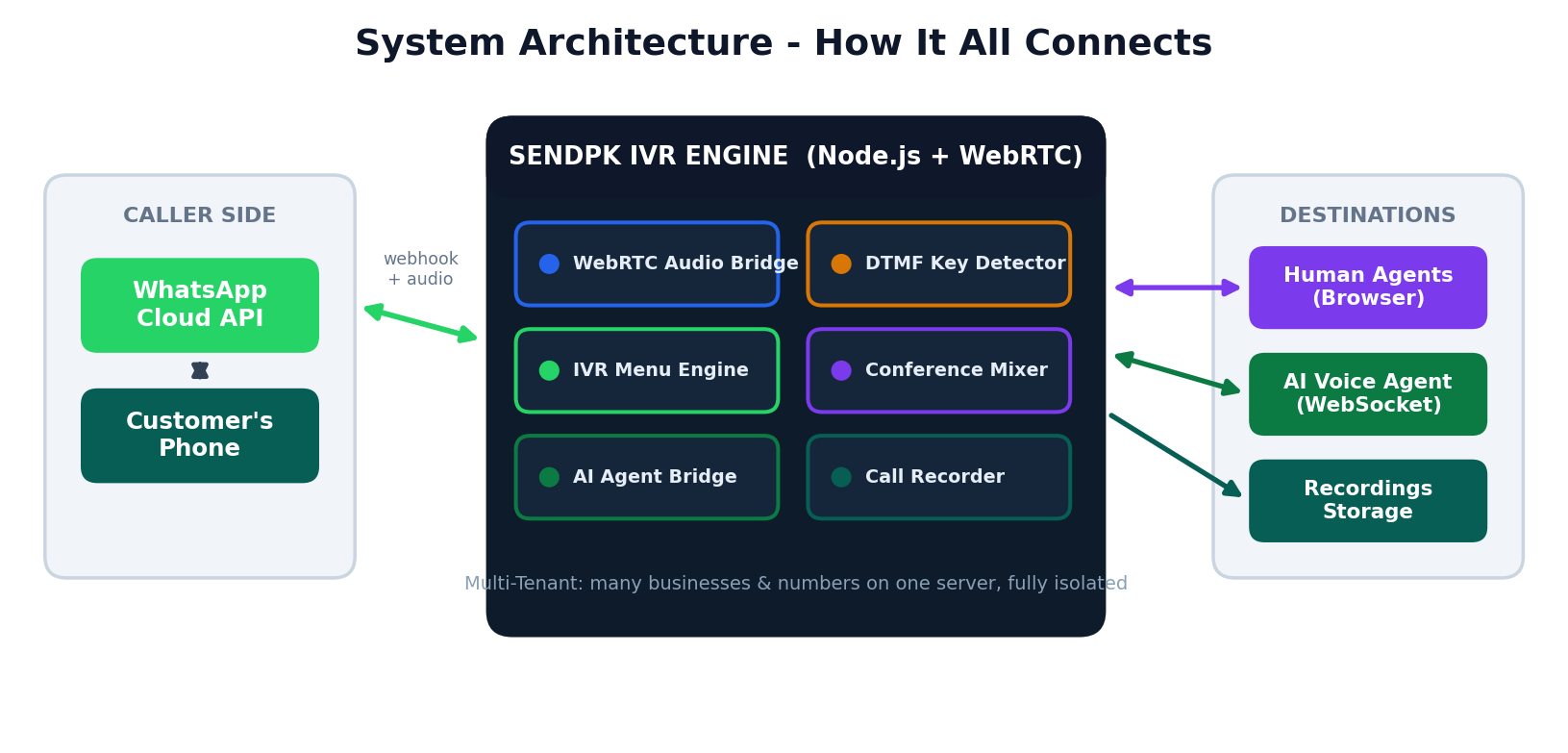
- Caller side: the customer’s phone connects through the official WhatsApp Cloud API.
- IVR engine: handles the live audio, detects key-presses, runs your menus, mixes conference calls, and records everything.
- Destinations: human agents in a browser, an AI voice agent, or secure recordings storage.
Why Automate? The Benefits — فوائد
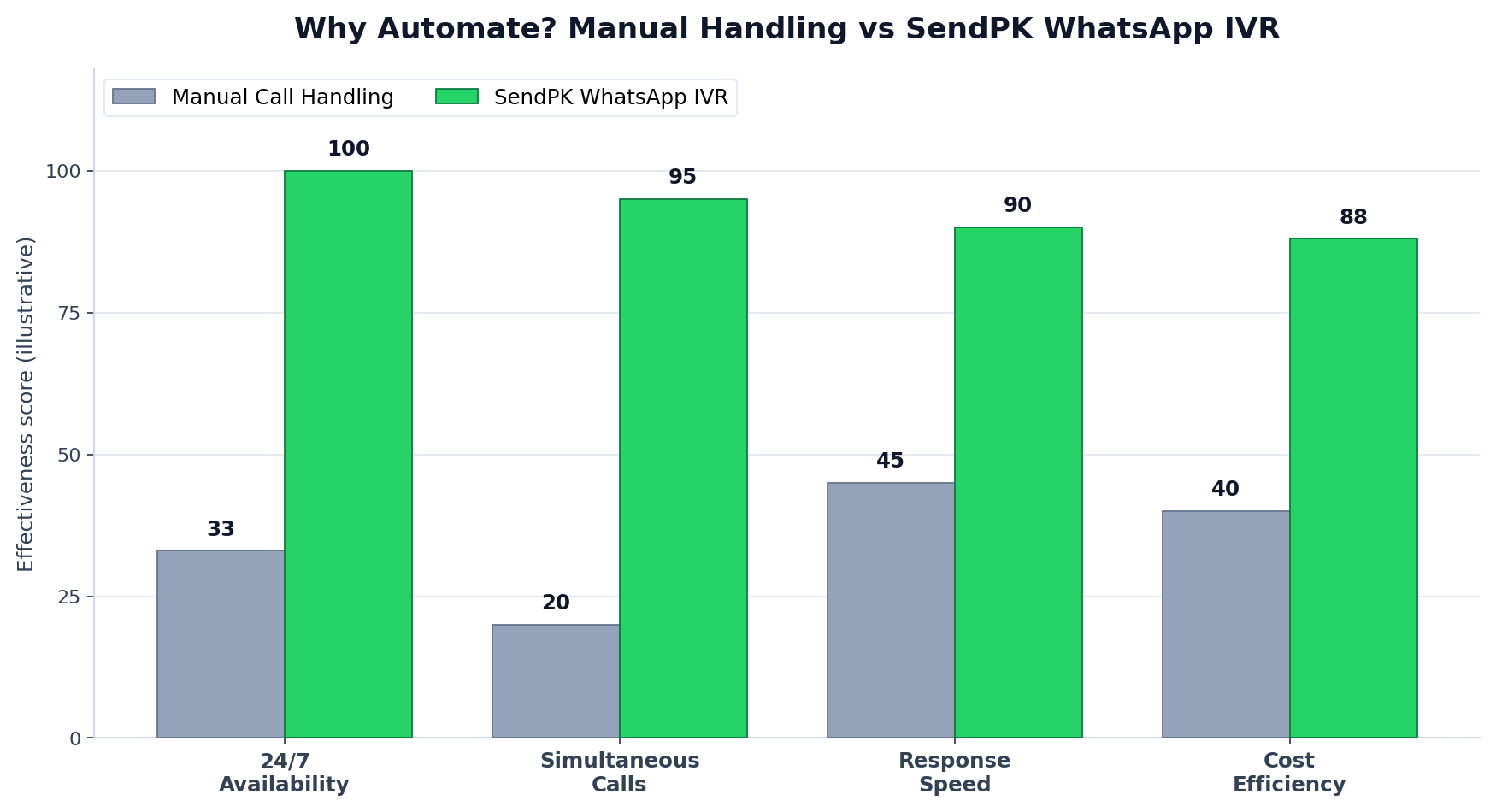
Compared to handling calls manually, an automated WhatsApp IVR is always available, can handle many calls at the same moment, responds instantly, and dramatically lowers your staffing cost. The chart above shows the difference at a glance.
- Never miss a call — available 24/7, even outside office hours.
- Handle many callers at once instead of one line at a time.
- Lower costs — fewer staff needed for routine questions.
- Consistent, professional experience on every single call.
- Insights & records — every call logged and recorded.
Real Use Cases — استعمال کی مثالیں
یہ سسٹم تقریباً ہر کاروبار کے لیے مفید ہے۔ چند مثالیں:
- Banks & Finance / بینک: بیلنس معلوم کرنا، آخری ٹرانزیکشنز سننا، یا کارڈ بلاک کروانا — سب کچھ کال پر۔
- Online Stores / آن لائن اسٹور: آرڈر کی تازہ صورتحال جاننا یا واپسی کی درخواست دینا۔
- Clinics & Hospitals / کلینک: اپائنٹمنٹ بک کروانا یا اوقاتِ کار معلوم کرنا۔
- Schools & Institutes / اسکول: فیس کی معلومات یا چھٹیوں کا اعلان سننا۔
How to Get Started — سیٹ اپ کیسے کریں
- Connect your WhatsApp Business number to SendPK.
- Record or upload your voice menus (welcome message, options, etc.).
- Set up your menu structure and choose where each key leads.
- Add your agents or enable the AI voice agent.
- Go live — your WhatsApp number is now a full call center.
سیٹ اپ آسان ہے اور SendPK کی ٹیم پورے عمل میں آپ کی مدد کرتی ہے۔
Frequently Asked Questions — عام سوالات
Do my customers need to install anything?
No. They simply call your WhatsApp number from their normal WhatsApp app — nothing extra to install.
Can the menus be in Urdu?
Yes — you record the menus in any voice and language you like, including Urdu, English, or a mix of both.
What happens if all agents are busy?
The caller hears hold-music until an agent is free, or the AI voice agent can assist them immediately.
Are the calls recorded?
Yes, every call is recorded automatically and stored securely with the caller’s details for your review.
Ready to turn WhatsApp into your call center?
Get WhatsApp Calling & the Smart IVR System set up for your business today.
اپنے کاروبار کے لیے WhatsApp Calling اور IVR سسٹم سیٹ اپ کروانے کے لیے آج ہی SendPK سے رابطہ کریں۔
Want to feel it first? Call our live demo on WhatsApp: +92 335 6742000